Creating packages in WHM is an essential practice for resellers who want to offer personalized and efficient hosting services to their clients. By defining packages, you can allocate specific resources, such as disk space, bandwidth, and the number of email accounts, tailoring them to the individual needs of each client. This not only simplifies the management of multiple hosting accounts from a single panel but also allows you to offer clear and structured plans, improving customer satisfaction and experience.
With well-defined packages, you can optimize the use of server resources, ensure optimal performance, and provide quality service that meets the demands of each client.
- Go to your WHM login URL and sign in. Typically, the URL is https://yourdomain.com:2087
- Use the search bar on the left-hand panel to find the "Packages" section.
- Select "Add a Package" from the list of results.
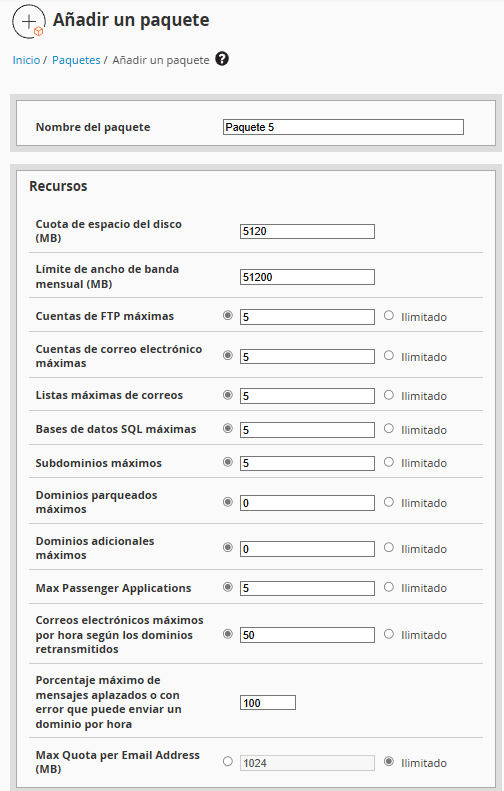
- Fill out the form with the desired specifications for your client. Here is an example configuration:
* Package Name: Package 5* Disk Space: 5GB* Monthly Bandwidth: 50GB (It is recommended 10 times the disk space)* Email Accounts: 5* MySQL Databases: 5* Subdomains: 5* Additional Domains: 0 (It is recommended one domain per cPanel account) - Once you have verified everything, click "Add" or "Create" to save the new package.
Assign the Package to an Account
To assign this new package to an existing hosting account or when creating a new account,
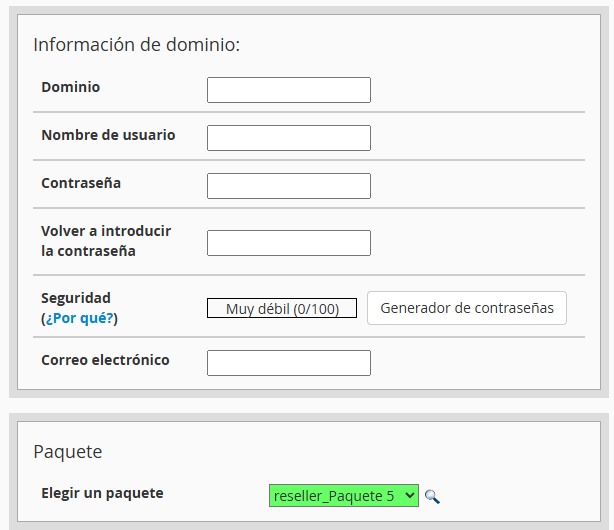
- Go to the "Create a New Account" section in the WHM menu
- Fill in the details of the new account and select the newly created package from the "Package" dropdown menu.
- Click "Create" to finalize the process.
Congratulations! You have successfully created a new hosting package and assigned it to your client's account. This will allow your clients to have the necessary resources to manage their websites efficiently.
If you have any questions or need additional assistance, please do not hesitate to contact us.